Video Transcoding With FlowChassis Survives a Crash Without Starting Over
Some jobs take minutes or hours. Transcoding a long video is the classic one. The usual design is a worker that picks up the job and grinds through it, and when that worker dies at 80 percent, say because a deploy restarted it, the job starts again from zero.
Starting over is fine once. On a busy system with regular deploys it means the longest jobs are the ones that never finish.
This case study is a complete program in the repository that you can kill yourself. It stores two uploaded videos, transcodes them, makes thumbnails and publishes them. Kill it while it transcodes, run the same command again, and it carries on at the segment it was on.
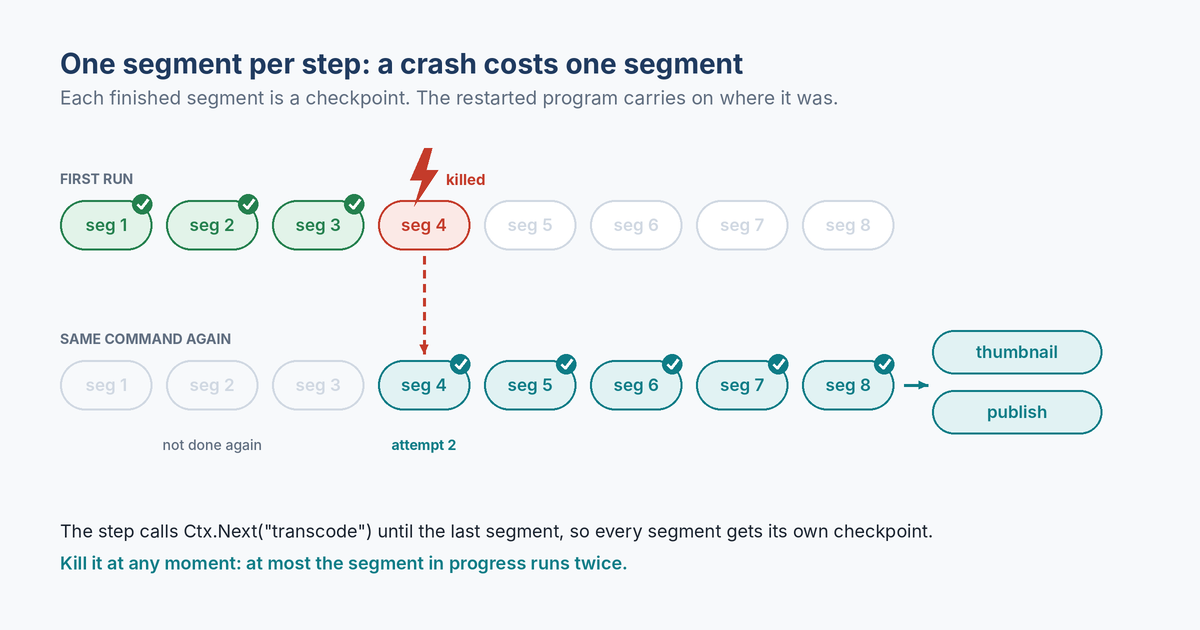
One Segment Per Step
A FlowChassis step is the unit of recovery. A crash during a step means that step runs again on the next start. So if transcoding were one big step, a crash would still cost the whole transcode.
The trick is to make each segment its own pass through the step. The step does one segment, records how far it got, and sends the run back to itself with Ctx.Next until the last one:
{
	Name: "transcode",
	Do: func(c *flowchassis.Ctx) error {
		v := video(c)
		seg := 0
		if b, ok := c.Get("segment"); ok {
			seg, _ = strconv.Atoi(string(b))
		}
		if err := m.transcode(c, seg); err != nil {
			return err
		}
		c.Set("segment", []byte(strconv.Itoa(seg+1)))
		if seg+1 < v.Segments {
			c.Next("transcode") // the next segment, after this checkpoint
		}
		return nil
	},
	Retry: flowchassis.RetryPolicy{MaxAttempts: 10, Backoff: 100 * time.Millisecond},
},
Every finished segment is a checkpoint in the journal, flushed to disk before the next one starts. The segment counter lives in the run’s state, saved with that checkpoint. After the last segment the step doesn’t call Next, so the run moves on to thumbnail and publish.
The segment work itself writes each segment’s file whole and renames it into place. Doing a segment a second time just replaces the file. That matters because the segment in progress when the process dies will run again.
Killing It
Here is a real run, built first so the kill reaches the program itself, then killed with kill -9 after about two and a half seconds:
$ go build -o media ./examples/media && ./media
Working in /tmp/flowchassis-media-example
  storage    store original keynote.mov -> storage-1
  storage    store original product-demo.mov -> storage-2
  transcode  keynote.mov segment 1 of 8 (attempt 1)
  transcode  product-demo.mov segment 1 of 6 (attempt 1)
  transcode  product-demo.mov segment 2 of 6 (attempt 1)
  transcode  keynote.mov segment 2 of 8 (attempt 1)
  transcode  product-demo.mov segment 3 of 6 (attempt 1)
  transcode  keynote.mov segment 3 of 8 (attempt 1)
  transcode  product-demo.mov segment 4 of 6 (attempt 1)
  transcode  keynote.mov segment 4 of 8 (attempt 1)
[kill -9 from another terminal]
And the same command again:
$ ./media
Working in /tmp/flowchassis-media-example
keynote.mov was cut off at transcode; carrying on (3 of 8 segments done)
product-demo.mov was cut off at transcode; carrying on (3 of 6 segments done)
  transcode  keynote.mov segment 4 of 8 (attempt 2)
  transcode  product-demo.mov segment 4 of 6 (attempt 2)
  transcode  product-demo.mov segment 5 of 6 (attempt 1)
  transcode  keynote.mov segment 5 of 8 (attempt 1)
  transcode  keynote.mov segment 6 of 8 (attempt 1)
  transcode  product-demo.mov segment 6 of 6 (attempt 1)
  transcode  keynote.mov segment 7 of 8 (attempt 1)
  storage    thumbnail for product-demo.mov -> storage-3
  cdn        publish product-demo.mov, 6 segments -> done
  transcode  keynote.mov segment 8 of 8 (attempt 1)
  storage    thumbnail for keynote.mov -> storage-4
  cdn        publish keynote.mov, 8 segments -> done
keynote.mov => completed
product-demo.mov => completed
Both videos were mid-transcode when the process died. The second run didn’t store the originals again, and didn’t redo segments one to three. It picked up segment four, the one that was cut off, as attempt 2.
That attempt number is worth a second look. A crash-cut attempt counts. If something about segment four crashes the process every single time, a corrupt frame for instance, the run doesn’t loop forever. After ten attempts it gives up and the run compensates.
There’s no recovery code in the program. It opens the journal, registers the flow and calls Start for each video. Runs already in the journal resume as soon as the flow is registered, and Start with an existing ID just finds the run.
Tested With a Real Kill
The example’s test does what you’d do by hand. It starts the program as a child process, kills it with SIGKILL once three segments are on disk, runs it again and checks:
- every segment file exists, for both videos
- the second run started at the segment that was cut off, not earlier
- each video was published exactly once, with all its segments
That test runs on Linux, macOS and Windows on every change to FlowChassis.
What To Take From It
The cost of a crash is the size of your step. Make the step one segment, or one batch of a thousand rows, and a crash costs at most that much. The engine keeps count of where the job got to, which is the part that’s usually painful to write by hand.
go run ./examples/media
# press Ctrl-C while it transcodes, then run it again
Ctrl-C works with go run. To kill it from another terminal, build it first as above. A kill -9 sent to go run stops only the go command and leaves the program running.
For the other half of crash safety, the outside calls, see how the webhook delivery case study keeps a retried request from being processed twice.